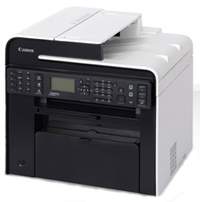
Canon i-SENSYS MF4890dw printer model is a personal desktop machine that can produce the optimum print output quality. It also has a power voltage support for a range between 220 and 240 volts of an AC. However, this range of power requirements can vary by the country where the machine is in use. On the other hand, the power consumption also goes by the printer model. For instance, the maximum print consumption is up to 1320 watts or less.
Canon i-SENSYS MF4890dw driver Downloads for Microsoft Windows 32-bit – 64-bit and Macintosh Operating System.
Supported Toner Cartridges
Toner Cartridge 728 Black : Approx 2100 Pages
Canon i-SENSYS MF4890dw Driver for Windows
Supported OS: Windows 11 (64-bit), Windows 10 (32-bit), Windows 10 (64-bit), Windows 8.1 (32-bit), Windows 8.1 (64-bit), Windows 8 (32-bit), Windows 8 (64-bit), Windows 7 (32-bit), Windows 7 (64-bit), Windows Vista (32-bit), Windows Vista (64-bit), Windows XP (32-bit), Windows XP (64-bit)
MF Drivers for Windows 32-bit
Supported OS:Windows 10, 8, 8.1, 7, XP, Vista 32-bit
108.38 MB
MF Drivers for Windows 64-bit
Supported OS:Windows 11, 10, 8, 8.1, 7, XP, Vista 64-bit
108.38 MB
Patch for Network Scan and USB Scan for Windows 32-bit and 64-bit
Supported OS:Windows 10, 8, 8.1 32-bit and 64-bit
7.72 MB
Driver and Software for Mac OS
Supported OS: macOS Monterey 12, macOS Big Sur 11, macOS Catalina 10.15, macOS Mojave 10.14, macOS High Sierra 10.13, macOS Sierra 10.12, OS X El Capitan 10.11, OS X Yosemite 10.10, OS X Mavericks 10.9, OS X Mountain Lion 10.8, OS X Lion 10.7, Mac OS X Snow Leopard 10.6, Mac OS X Leopard 10.5
MF Printer Driver and Utilities for macOS
Supported OS:macOS 10.11 to 12
22.21 MB
Scanner Driver and Utilities for macOS
Supported OS:macOS 10.12 to 12
86.90 MB
Fax Driver and Utilities for macOS
Supported OS:macOS 10.12 to 12
21.07 MB
Scanner Driver and Utilities for macOS
Supported OS:macOS 10.11
84.36 MB
Fax Driver and Utilities for macOS
Supported OS:macOS 10.11
15.10 MB
MF Printer Driver and Utilities for macOS
Supported OS:macOS 10.10
22.21 MB
Scanner Driver and Utilities for macOS
Supported OS:macOS 10.10
84.18 MB
Fax Driver and Utilities for macOS
Supported OS:macOS 10.10
14.48 MB
MF Printer Driver and Utilities for macOS
Supported OS:macOS 10.9
22.19 MB
Scanner Driver and Utilities for macOS
Supported OS:macOS 10.9
84.31 MB
Fax Driver and Utilities for macOS
Supported OS:macOS 10.9
15.21 MB
MF Printer Driver and Utilities for macOS
Supported OS:macOS 10.8
22.09 MB
Scanner Driver and Utilities for macOS
Supported OS:macOS 10.8
81.36 MB
Fax Driver and Utilities for macOS
Supported OS:macOS 10.8
14.23 MB
MF Printer Driver and Utilities for macOS
Supported OS:macOS 10.7
19.80 MB
Scanner Driver and Utilities for macOS
Supported OS:macOS 10.7
67.03 MB
Fax Driver and Utilities for macOS
Supported OS:macOS 10.7
12.18 MB
MF Printer Driver and Utilities for macOS
Supported OS:macOS 10.6
47.25 MB
Scanner Driver and Utilities for macOS
Supported OS:macOS 10.6
84.89 MB
Fax Driver and Utilities for macOS
Supported OS:macOS 10.6
37.79 MB
MF Printer Driver and Utilities for macOS
Supported OS:macOS 10.5
34.36 MB
Fax Driver for macOS
Supported OS:macOS 10.5 to 10.11
23.72 MB
TWAIN Scanner Driver and Utilities for macOS
Supported OS:macOS 10.5 to 10.11
69.50 MB
Canon i-SENSYS MF4890dw driver for Linux
Supported OS: Linux (32-bit), Linux (64-bit)
UFR II – UFR II LT Printer Driver for Linux
Supported OS:Linux
69.88 MB
Specifications
Furthermore, the average consumption during the standby mode is about 5.0 watts or even less. In comparison, the average power consumption during sleep mode is about 1.4 watts. But when the main power switch is off, the power level of consumption is about 0.5 watts or less. The warm-up time is about 13.5 seconds or less from the time of powering on the machine. Its average weight is about 13.4 kg, including the importance of the device.
This machine can perform at the optimum level of print. It requires a temperature range of 10 and 300C. Besides, the relative humidity is between 20 and 80% with no condensation. It also has an indirect electrostatic system with on-demand fixing. The main paper tray can load up to 250 sheets of plain paper with a weight between 60 and 80 gsm. The output tray can load up to 100 sheets with an average value of 75 gsm.
The rate of printing with Canon i-SENSYS MF4890dw mode is about 25 pages per minute (ppm). Its first print time for an A4 paper printing is about 6 seconds or less. It has an average resolution of 600 x 600 dots per inch (dpi). On the other hand, the maximum print resolution of 1200 x 600 dpi with 256 levels of gradation.
