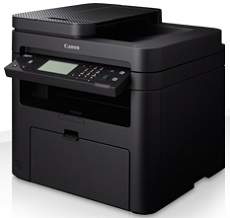
The Canon i-SENSYS MF226dn model is a monochrome device which has a fantastic opportunity to produce high-quality output. Some of the available options include printing, copying, and scanning, as well as faxing documents. Besides, the printing rate with this device is up to 27 pages per minute with the A4 paper size. At the same time, it uses the monochrome laser print technology that maintains a high-quality resolution. Therefore, the average print resolution is about 600 x 600 dots per inch (dpi).
Canon i-SENSYS MF226dn driver Downloads for Microsoft Windows 32-bit – 64-bit and Macintosh Operating System.
Toner Cartridge Details: 737 Toner Cartridge Black: Yields approx 2400 Pages
Canon i-SENSYS MF226dn Driver for Windows
Supported OS: Windows 11 (64-bit), Windows 10 (32-bit), Windows 10 (64-bit), Windows 8.1 (32-bit), Windows 8.1 (64-bit), Windows 8 (32-bit), Windows 8 (64-bit), Windows 7 (32-bit), Windows 7 (64-bit), Windows Vista (32-bit), Windows Vista (64-bit), Windows XP (32-bit), Windows XP (64-bit)
MF Drivers for Windows 32-bit(Recommended)
Supported OS:Windows 10, 8, 8.1, 7, XP, Vista 32-bit
119.77 MB
MF Drivers for Windows 64-bit(Recommended)
Supported OS:Windows 11, 10, 8, 8.1, 7, XP, Vista 64-bit
119.77 MB
Patch for Network Scan and USB Scan for Windows 32-bit and 64-bit
Supported OS:Windows 10, 8, 8.1 32-bit and 64-bit
7.72 MB
UFR II – UFRII LT V4 Printer Driver for Windows 32-bit and 64-bit
Supported OS:Windows 11, 10, 8.1 32-bit and 64-bit
114.31 MB
Driver and Software for Mac OS
Supported OS: macOS Monterey 12, macOS Big Sur 11, macOS Catalina 10.15, macOS Mojave 10.14, macOS High Sierra 10.13, macOS Sierra 10.12, OS X El Capitan 10.11, OS X Yosemite 10.10, OS X Mavericks 10.9, OS X Mountain Lion 10.8, OS X Lion 10.7, Mac OS X Snow Leopard 10.6, Mac OS X Leopard 10.5
TWAIN Scanner Driver and Utilities for macOS
Supported OS:macOS 10.5 to 10.11
69.50 MB
MF Printer Driver and Utilities for macOS
Supported OS:macOS 10.11 to 12
22.21 MB
Scanner Driver and Utilities for macOS
Supported OS:macOS 10.12 to 12
86.90 MB
Fax Driver and Utilities for macOS
Supported OS:macOS 10.12 to 12
21.07 MB
Scanner Driver and Utilities for macOS
Supported OS:macOS 10.11
84.36 MB
Fax Driver and Utilities for macOS
Supported OS:macOS 10.11
15.10 MB
MF Printer Driver and Utilities for macOS
Supported OS:macOS 10.10
22.21 MB
Scanner Driver and Utilities for macOS
Supported OS:macOS 10.10
84.18 MB
Fax Driver and Utilities for macOS
Supported OS:macOS 10.10
14.48 MB
MF Printer Driver and Utilities for macOS
Supported OS:macOS 10.9
22.19 MB
Scanner Driver and Utilities for macOS
Supported OS:macOS 10.9
84.31 MB
Fax Driver and Utilities for macOS
Supported OS:macOS 10.9
15.21 MB
MF Printer Driver and Utilities for macOS
Supported OS:macOS 10.8
22.09 MB
Scanner Driver and Utilities for macOS
Supported OS:macOS 10.8
81.36 MB
Fax Driver and Utilities for macOS
Supported OS:macOS 10.8
14.23 MB
MF Printer Driver and Utilities for macOS
Supported OS:macOS 10.7
19.80 MB
Scanner Driver and Utilities for macOS
Supported OS:macOS 10.7
67.03 MB
Fax Driver and Utilities for macOS
Supported OS:macOS 10.7
12.18 MB
MF Printer Driver and Utilities for macOS
Supported OS:macOS 10.6
47.25 MB
Scanner Driver and Utilities for macOS
Supported OS:macOS 10.6
84.89 MB
Fax Driver and Utilities for macOS
Supported OS:macOS 10.6
37.79 MB
MF Printer Driver and Utilities for macOS
Supported OS:macOS 10.5
34.36 MB
Fax Driver for macOS
Supported OS:macOS 10.5 to 10.11
23.72 MB
Driver for Linux
Supported OS: Linux (32-bit), Linux (64-bit)
UFR II – UFRII LT Printer Driver for Linux
Supported OS:Linux
69.88 MB
Specifications
On the other hand, the optimum print quality is up to 1200 x 1200 dpi to aid an automatic image refinement feature. Similarly, the machine can produce double-sided printing through a mechanical component. It also has a first print out time of 6.0 seconds or less from the ready mode. The compatible print language is the UFRII LT, while it also has a toner saver mode for output maintenance. Also, the print margin for envelope size is up to 10 mm on all four sides.
On the other hand, it allows a print margin of 5 mm for the four sides for different paper sizes apart from envelopes. As a multifunctioning printer, it has a copy speed of up to 27 ppm for A4 paper. It also has a first copy output time of approximately 9 seconds or less. The copy mode supports text, photo/text, text/photo+, and photo document types. It also has a multicopy feature, producing up to 99 copies from a single original document.
Simultaneously, the machine is capable of an optical resolution of up to 600 x 600 dpi. However, the enhanced is up to 9600 x 9600 dpi with a color scanning depth of 24-bit. There are also 256 levels of greyscales to maintain its functionality. It is also compatible with WIA and TWAIN components with a maximum scan width of 216 mm. Download Canon i-SENSYS MF226dn driver from Canon Website
