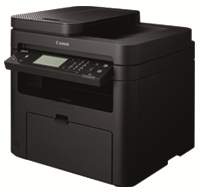
Canon i-SENSYS MF217w model has several impressive specifications that make it stand out among many other model members. For instance, this machine is capable of printing, copying, scanning, and faxing documents. Each of these functions can produce optimum quality and at an incredible speed too. The print and copy speed are about 23 pages per minute (ppm) when using the A4 paper. By the way, the machine uses the monochrome laser print technology for optimum yield.
Canon i-SENSYS MF217w driver Downloads for Microsoft Windows 32-bit – 64-bit and Macintosh Operating System.
Supported Toner Cartridges: Black 737 Toner Cartridge : Upto 2400 Pages
Canon i-SENSYS MF217w Driver for Windows
Supported OS: Windows 11 (64-bit), Windows 10 (32-bit), Windows 10 (64-bit), Windows 8.1 (32-bit), Windows 8.1 (64-bit), Windows 8 (32-bit), Windows 8 (64-bit), Windows 7 (32-bit), Windows 7 (64-bit), Windows Vista (32-bit), Windows Vista (64-bit), Windows XP (32-bit), Windows XP (64-bit)
MF Drivers for Windows 32-bit(Recommended)
Supported OS:Windows 10, 8, 8.1, 7, XP, Vista 32-bit
119.77 MB
MF Drivers for Windows 64-bit(Recommended)
Supported OS:Windows 11, 10, 8, 8.1, 7, XP, Vista 64-bit
119.77 MB
Patch for Network Scan and USB Scan for Windows 32-bit and 64-bit
Supported OS:Windows 10, 8, 8.1 32-bit and 64-bit
7.72 MB
UFR II – UFRII LT V4 Printer Driver for Windows 32-bit and 64-bit
Supported OS:Windows 11, 10, 8.1 32-bit and 64-bit
114.31 MB
Driver and Software for Mac OS
Supported OS: macOS Monterey 12, macOS Big Sur 11, macOS Catalina 10.15, macOS Mojave 10.14, macOS High Sierra 10.13, macOS Sierra 10.12, OS X El Capitan 10.11, OS X Yosemite 10.10, OS X Mavericks 10.9, OS X Mountain Lion 10.8, OS X Lion 10.7, Mac OS X Snow Leopard 10.6, Mac OS X Leopard 10.5
TWAIN Scanner Driver and Utilities for macOS
Supported OS:macOS 10.5 to 10.11
69.50 MB
MF Printer Driver and Utilities for macOS
Supported OS:macOS 10.11 to 12
22.21 MB
Scanner Driver and Utilities for macOS
Supported OS:macOS 10.12 to 12
86.90 MB
Fax Driver and Utilities for macOS
Supported OS:macOS 10.12 to 12
21.07 MB
Scanner Driver and Utilities for macOS
Supported OS:macOS 10.11
84.36 MB
Fax Driver and Utilities for macOS
Supported OS:macOS 10.11
15.10 MB
MF Printer Driver and Utilities for macOS
Supported OS:macOS 10.10
22.21 MB
Scanner Driver and Utilities for macOS
Supported OS:macOS 10.10
84.18 MB
Fax Driver and Utilities for macOS
Supported OS:macOS 10.10
14.48 MB
MF Printer Driver and Utilities for macOS
Supported OS:macOS 10.9
22.19 MB
Scanner Driver and Utilities for macOS
Supported OS:macOS 10.9
84.31 MB
Fax Driver and Utilities for macOS
Supported OS:macOS 10.9
15.21 MB
MF Printer Driver and Utilities for macOS
Supported OS:macOS 10.8
22.09 MB
Scanner Driver and Utilities for macOS
Supported OS:macOS 10.8
81.36 MB
Fax Driver and Utilities for macOS
Supported OS:macOS 10.8
14.23 MB
MF Printer Driver and Utilities for macOS
Supported OS:macOS 10.7
19.80 MB
Scanner Driver and Utilities for macOS
Supported OS:macOS 10.7
67.03 MB
Fax Driver and Utilities for macOS
Supported OS:macOS 10.7
12.18 MB
MF Printer Driver and Utilities for macOS
Supported OS:macOS 10.6
47.25 MB
Scanner Driver and Utilities for macOS
Supported OS:macOS 10.6
84.89 MB
Fax Driver and Utilities for macOS
Supported OS:macOS 10.6
37.79 MB
MF Printer Driver and Utilities for macOS
Supported OS:macOS 10.5
34.36 MB
Fax Driver for macOS
Supported OS:macOS 10.5 to 10.11
23.72 MB
Driver for Linux
Supported OS: Linux (32-bit), Linux (64-bit)
UFR II – UFRII LT Printer Driver for Linux
Supported OS:Linux
69.88 MB
Specifications
On average, the Canon i-SENSYS MF217w model can produce a print resolution of 600 x 600 dots per inch (dpi). On the other hand, the maximum print quality resolution is up to 1200 x 1200 dpi. But this resolution is only possible through an automatic image refinement (AIR) component. It also takes about 6 seconds or less for the machine to print the first-ever page. Concerning the printer language, this machine can work with the UFRII LT and the toner saver mode.
The first copy output time is about 9.0 seconds or less for the A4 paper size in copying. At the same time, the copy resolution is not more than 600 x 600 dpi. Copy modes include documents with text, text/photo+, text/photo, and photo formats. The copying mode also can carry out multiple copy feature for up to 99 copies. Besides, it can reduce the output image to 25% of the original document size. On the other hand, the enlargement can reach up to 400% of the original size.
In terms of the scanner type, the machine uses a flatbed component with an automatic document feeder (ADF). But the standard paper input tray can accommodate up to 250 sheets of plain paper. The ADF can take up to 35 extra sheets with an average weight of 80 gsm or less whereas, the main tray apart. However, the output paper tray will accommodate up to 100 sheets of printed paper. Download Canon i-SENSYS MF217w driver from Canon Website
