
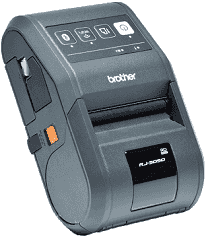
The printing technology for this device is the direct thermal print technology which produces an average print resolution of 203 dpi. More so, the speed of the printer is at maximum, 127 mm per second under the Brother standard environment but largely depends on the type of media in use. The maximum print width is 72 mm; the maximum length is 1m while the maximum print length which also depends on the kind of media in use include 6 mm for the label, and receipt but with the black mark only.
Brother RJ-3050 Driver for Windows
Driver and Software for Mac OS
Driver for Linux
Specifications
The weight of this outstanding printer is about 610 g including that of the inbuilt battery. On the other hand, the dimensions of the Brother RJ-3050 printer are about 113 mm of width, 80 mm for the height and 186 mm for its depth. The interface connectivity options for this device includes the USB version 2.0 full speed as well as a Bluetooth component using the version 2.1 of the +EDR class 1 component.
The third option of connectivity is the Wireless LAN connection is through the IEEE 802.11 b/g/n infrastructure or ad-hoc mode. The appropriate environmental conditions include an operating temperature between -100C to 500C during operation and 0 to 400C while charging. The operating humidity and that of maximum print quality are also between 10 and 90% without condensation and a maximum wet bulb temperature.
The power options of the printer to work optimally can either be through the AC adapter that should have up to 15 volts. Alternatively, the cigarette car adapter or a wired type or through the rechargeable Li-ion battery of 7.2 volts. This battery yield is up to 5300 labels when a connection is through the USB and with a new battery. The tested battery uses Brother’s print test data with 8.5 % storage. Download Brother RJ-3050 driver from Brother website.