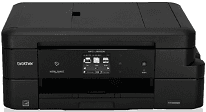
This product is another classy product with intelligent use of printing at high speed and quality that beats many other devices. One of the outstanding properties of this printer is its inkjet print technology with two possible print heads such as the monochrome and the color printing heads. The monochrome print head only has one piezo with 210 nozzles whereas the color print head has three of such compositions for the cyan, magenta and yellow colors.
Brother MFC-J985DW Driver for Windows
Supported OS: Windows 11 (64-bit), Windows 10 (32-bit), Windows 10 (64-bit), Windows 8.1 (32-bit), Windows 8.1 (64-bit), Windows 8 (32-bit), Windows 8 (64-bit), Windows 7 (32-bit), Windows 7 (64-bit), Windows Vista (32-bit), Windows Vista (64-bit), Windows XP (32-bit), Windows XP (64-bit)
Full Driver and Software Package for Windows 32-bit and 64-bit(Recommended)
Supported OS:Windows 11, 10, 8.1, 8, 7, Vista, XP 32-bit and 64-bit
358.56 MB
Printer Driver and Scanner Driver for Local Connection for Windows 32-bit and 64-bit
Supported OS:Windows 11, 10, 8.1, 8, 7, Vista, XP 32-bit and 64-bit
45.29 MB
Driver and Software for Mac OS
Supported OS: macOS Monterey 12, macOS Big Sur 11, macOS Catalina 10.15, macOS Mojave 10.14, macOS High Sierra 10.13, macOS Sierra 10.12, OS X El Capitan 10.11, OS X Yosemite 10.10, OS X Mavericks 10.9, OS X Mountain Lion 10.8
ICA Scanner Driver for macOS
Supported OS:macOS 12
2.53 MB
ICA Scanner Driver for macOS
Supported OS:macOS 11
2.50 MB
Printer Driver for macOS
Supported OS:macOS 10.15
26.91 MB
ICA Scanner Driver for macOS
Supported OS:macOS 10.15
2.28 MB
Printer Full Drivers for macOS
Supported OS:macOS 10.14
47.57 MB
Printer Driver for macOS
Supported OS:macOS 10.14
26.91 MB
Scanner Driver for macOS
Supported OS:macOS 10.14
293.09 MB
Printer Full Drivers for macOS
Supported OS:macOS 10.11 to 10.13
47.51 MB
Printer Driver for macOS
Supported OS:macOS 10.11 to 10.13
26.97 MB
Scanner Driver for macOS
Supported OS:macOS 10.13
293.23 MB
Scanner Driver for macOS
Supported OS:macOS 10.12
293.07 MB
Brother MFC-J985DW Scanner Driver for macOS
Supported OS:macOS 10.8 to 10.11
294.43 MB
Printer Full Drivers for macOS
Supported OS:macOS 10.9 to 10.13
47.52 MB
Printer Full Drivers for macOS
Supported OS:macOS 10.8
47.65 MB
Brother MFC-J985DW Printer Driver for macOS
Supported OS:macOS 10.8 to 10.13
28.49 MB
Driver for Linux
Supported OS: Linux (32-bit), Linux (64-bit)
LPR Printer driver for Linux
Supported OS:Linux (RPM Package)
2.50 MB
CUPSwrapper Printer driver for Linux
Supported OS:Linux (RPM Package)
17.01 kB
Scanner driver for Linux
Supported OS:Linux (RPM Package)
98.10 kB
Scanner driver for Linux
Supported OS:Linux (RPM Package)
116.23 kB
PC-FAX driver for Linux
Supported OS:Linux (RPM Package)
45.15 kB
LPR Printer driver for Linux
Supported OS:Linux (DEB Package)
2.49 MB
CUPSwrapper Printer driver for Linux
Supported OS:Linux (DEB Package)
14.31 kB
Scanner driver for Linux
Supported OS:Linux (DEB Package)
90.55 kB
Scanner driver for Linux
Supported OS:Linux (DEB Package)
108.64 kB
PC-FAX driver for Linux
Supported OS:Linux (DEB Package)
38.30 kB
Specifications
The internal memory of the Brother MFC-J985DW device is up to 128 MB of RAM whereas the display feature comprises of the liquid crystal display (LCD) that is about 2.7 inches in diagonal measurement. This component is also a TFT touchscreen LCD and touchpanel that make it quite very easy to operate the computer.
The primary power source of the machine is through the alternating current of 220 to 240 volts range at a frequency of 50/60 Hz. Power consumption depends on the current activity of the printer. For instance, printing and copying work at an average power usage of approximately 19 watts while the active mode uses 3.5 watts of power. The sleep mode uses a power currency of up to 1.3 watts, but when the printer is off but still connected, the power usage is 0.2 watts.
The physical dimensions of the device comprise of a height of about 227 mm; the depth is about 172 mm while the width is 341 mm. However, with the opening up of both the input and output trays, the diameter becomes 583 mm. The weight of the device is about 8.5 kg.
Users should also bear in mind that this printer is capable of the document feeding through the automatic document feeder (ADF) for both single-sided and double-sided printing. The standard measurements are also according to the ISO9296 measuring standards. Download Brother MFC-J985DW driver from Brother website.
