
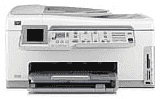
HP Photosmart C7288 is an office-sized printer for relatively all functions such as printing, scanning, copying, sending and receiving a fax. The essential overview features include an automatic document feeder (ADF), a color graphics display screen, and the main input tray. Others include an out tray, a paper guide along with the main tray, a paper-width and paper-length guide and paper tray extender. Items that are on its control panel include an attention light, a directional pad, and OK button. Others are Zoom button, Auto answer for fax option, Copy menu, Reprint, red-eye removal, etc.
HP Photosmart C7288 Driver for Windows
Driver and Software for Mac OS
HP Photosmart C7288 cartridges
Black Ink HP 02 Cartridge (~660 pages ), HP 02 Cyan Ink Cartridge (~400 pages ), HP 02 Magenta Ink Cartridge (~370 pages ), HP 02 Yellow Ink Cartridge (~500 pages ), HP 02 Light Magenta Ink Cartridge (~230 pages ), HP 02 Light Cyan Ink Cartridge (~220 pages )
Printer Specifications
1. The HP Photosmart C7288 printer support connection to a network using a hub with an Ethernet port and CAT-5 Ethernet cable. Note also that the printer supports both 10 Mbps and 100 Mbps Ethernet networks.
2. Another connection option is the wireless WLAN 802.11 network setup. This type of network connection referred to as an infrastructure network. The advantages of this include the following;
a. An advanced network security
b. Network flexibility
c. Better performance with 802.11g WLANs
d. Enhanced reliability
e. Shared Broadband Internet access
3. This printer supports different kinds of memory cards. Examples include;
a. CompactFlash (CF) types I and II
b. XD-Picture Card
c. Memory Stick, Memory stick Pro, Memory stick Magic gate, Memory stick duo or duo pro, etc. d. Transflash Micro SD card
e. Multimedia Card
f. Secure Digital (SD), SDHC, SDM, etc
4. The scanning option scans either to a computer or a memory card or any other storage device.
5. The printer physical dimensions include 9.5 x 17.7 x 17.4 inches (HWD) with a weight of 24.3 lbs.
6. Power specifications include consumption of 32.5 watts at maximum while it uses an average of 20.1 watts. The input voltage is an AC 100 to 240 Volts at 50 – 60 Hz and an output of DC 32 V.
Download HP Photosmart C7288 All-in-One Printer driver from HP website