
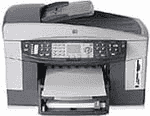
The HP Officejet 7410 is one of the best all-in-one printers of HP Company. Tasks like printing, scanning, faxing and copying from one device will save your money and power also. It comes in very compact size, and this printer can place in very less area. This printer uses the technology of drop-on-demand thermal inkjet method for printing the documents. It has the monthly duty cycle of 500 pages per month average and 5000 printed pages per month maximum.
HP Officejet 7410 Driver for Windows
Driver and Software for Mac OS
The printing language of this printer is HP PCL Level 3, PCL3 GUI and PCL 10. Printing speed varies according to the complexity of documents. Resolution of this printer is 1200×1200 dots per inch for black and 1200×1200 dots per inch for color print. From this printer, you can easily enlarge the documents from 25% to 400%.
HP Officejet Printer 7410 cartridges
HP94 Black Original Ink Cartridge (~480 pages ), HP 96 Black Inkjet Print Cartridge (~860 pages ), HP 95 Tri-color Inkjet Print Cartridge (~330 pages ), HP 97 Tri-color Original Ink Cartridge (~560 pages ), HP 99 Photo Original Ink Cartridge (~130 pages ), HP 100 Gray Photo Original Ink Cartridge (~80 pages )
In this HP printer, the copy speed is up to 30 copies per minute for black and 20 copies per minute for color. This printer has the Twain compliant interface also included in it. The resolution of the scanning a document is up to 2400×4800 dots per inch optical and 19200 dots per inch for enhancing (software). Faxing resolution is up to 200×200 dots per inch for black in excellent mode and 200×200 dots per inch for color.
Compatible operating system for HP Officejet 7410 driver:
1. Operating system: Windows 98, 98 SE, ME, 2000, XP (home, professional or media center) and Mac OS X 10.2.3, 10.3.x or 10.4.
2. Processor: Intel Pentium 2, G3
3. RAM: 128 Mb, 256 MB.
Latest operating system for HP Officejet 7410 driver:
Windows 10, 8, 8.1
Mac OS X v10.13 High Sierra.
Features of HP Officejet Printer 7410:
1. It doesn’t generate any Ozone gas.
2. In this, it easily converts the scanned text to editable text.
3. It supports various types of papers such as plain paper, legal paper, and cards.