
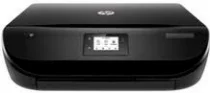
With the sleek, compact all-in-one design of HP DeskJet Ink Advantage 4535 driver printer can comfortably fit in less space. From this printer, you can place in any room, and with quiet mode, you will get very fewer disruptions. It is capable of doing the function of printing from different mobile phones. This printer provides a high quality of printing at very low cost. It also handles different types of scan format such as TIFF, JPEG, PNG, BMP, and PDF, etc.
HP DeskJet Ink Advantage 4535 Driver for Windows
Driver and Software for Mac OS
hp deskjet ink advantage 4535 cartridge details
HP680 Black Ink Cartridge(~480 pages), HP 680 Tri-color Ink Cartridge (~150 pages)
Specifications
HP DeskJet Ink Advantage 4535 driver supports various versions of Windows including Windows 10, 8.1, 8, 7, Windows Vista, Windows XP SP3. The Minimum processor for all windows versions is Intel Pentium 2 or 233 MHz processor. HP DeskJet Ink Advantage 4535 driver supports Mac OS X v 10.8, 10.9, 10.10. The Typical installation of the file requires the minimum space of free disk up to 850 MB.
HP DeskJet printer Ink Advantage 4535 also performs the function of ePrint form mobile. It has 1000 pages of a monthly duty cycle. The print technology of the HP DeskJet Ink Advantage 4535 is thermal inkjet with HP PCL 3 GUI language.
In the printing for black print in ISO mode is 9.5 (ppm) pages per minute or 20 (ppm) pages per minute in draft mode. For color print 6.8 (ppm) pages per minute in ISO mode and 16 (ppm) pages per minute for color print. HP Deskjet Ink Advantage printer 4535 resolution stands at 1200×1200 dpi rendered black. Whereas, for optimized resolution stands at 4800×1200 (dpi) dots per inch.
The copy resolution of HP printer DeskJet Ink Advantage 4535 stands at 600×300 (dpi) dots per inch for black and mixed graphics text. In the scan, the speed in normal mode is 4 (ppm) pages per minute color or for mono 8 (ppm) pages per minute. The bit depth in the scanning feature is 24-bit with 1200 (dpi) dots per inch optical resolution. Download HP DeskJet Ink Advantage 4535 All-in-One Printer driver from HP website.