
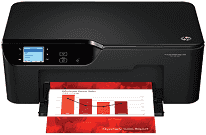
The HP Deskjet Ink Advantage 3525 printer offers a simple, compact design, reliable and gives ideal results. This printer performs various kinds of functions such as printing, copying, scanning and more. It is one of the perfect printers that are suitable for both commercial as well as personal use, and users can meet all their printing requirements.
HP Deskjet Ink Advantage 3525 Driver for Windows
Driver and Software for Mac OS
Specifications
When it comes to physical dimensions, the printer is 436 mm in width, 325 mm in depth and 146 mm in height. Moreover, HP Deskjet Ink Advantage 3525 printer weighs about 5 kg. It is so efficient and lightweight that’s why users can easily put around the house and any other area.
This printer also supports various media types such as legal pages, envelops, plain, inkjet, photo, and cards. The input tray capacity for plain paper is up to 80 sheets, and a maximum capacity for output tray is up to 15 sheets. Also, the capacity of the paper depends on the paperweight. It does support legal paper size 216 mm x 356 mm.
While the printing function works on drop-on-demand thermal inkjet technology and it supports PCL3 GUI language. The printing speed of this device varies according to the density of methods and documents. The normal color input mode is 600 x 300 dpi and automatic output. For max DPI mode, the color input is 1200 x 1200 dpi and automatic output for black 4800 dpi.
As for its copy specification, it supports digital image processing and resolution up to 600 dpi. And, it supports numerous file types such as BMP, JPEG, PNG, TIFF, and PDF. The scanner allows to user easily modified documents according to their needs. The enhanced resolution of the scanning specification is up to 2400 dpi. Also, the printer required input voltage up to 100-240 VAC. Download HP Deskjet Ink Advantage 3525 driver from Hp website