
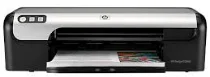
HP Deskjet D2460 printer model is a worldwide print model with a product number CB611A. Some of the basic features include borderless printing on supported paper sizes, an ink level indicator, and a button to launch HP Photosmart Express software. It also has a high-speed universal serial bus (USB). The maximum print capacity is up to 1000 pages per month and with a print cancel button. It also supports print speed according to the print cartridge capacities.
HP Deskjet D2460 Driver for Windows
Driver and Software for Mac OS
At the fast draft mode, black document printing has a speed of up to 20 pages per minute (ppm) after the first page. On the other hand, the mixed text with color graphics has a rate of up to 14 ppm after the first page. The photo printing on photo paper can be as fast as 44 seconds after the same model’s first page. However, without the white borders, photo printing on 4 x 6 inches photo paper is about 49 seconds after the first page.
Concerning the print resolution, the fast draft mode has a print resolution of 300 x 300 dots per inch (dpi) while using plain paper. However, the fast normal and standard methods produce a resolution of 600 x 600 dpi. The best mode while using inkjet paper has a print resolution of up to 1200 x 1200 dpi. The HP Deskjet D2460 Printer also has a maximum print resolution of up to 4800 x 1200 optimized dpi to use plain papers. The standard connectivity measure is the USB hi-speed port.
The standard compatible paper sizes include US letters, standard envelopes, index cards, A4, B5, A5, A6, and photo papers. On the other hand, the compatible paper types include plain paper, envelopes, index cards, greeting cards, transparent films, labels, and photo paper. The maximum noise level is about 56.0 decibels at the fast draft mode. Download HP Deskjet D2460 driver from HP website.