
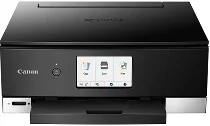
The functioning of the Canon PIXMA TS8220 depends mainly on the efficiency of its driver. This driver influences the print speed, such as borderless printing on 4 x 6 inches at 17 seconds. Also, black document printing has a rate of 15 images per minute (ipm), and color printing has a speed of 10.0 ipm. Meanwhile, the total number of nozzles in this device is up to 6656, which includes 5632 nozzles for color and 1024 nozzles for the pigment black document printing.
Canon PIXMA TS8220 Driver for Windows
Driver for Linux
Furthermore, the maximum print resolution is up to 4800 x 1200 dots per inch (dpi). Its supported ink types include PGI-280 pigment black ink and CLI-281 dye-based ink. As for the ink tank and fill volume, the PGI-280 pigment black can hold 11.2 ml in its standard volume and 18.5 ml in its XL version. But the CLI-281 can hold 5.6 ml by standard and 8.3 ml in the XL version. the compatible paper sizes also includes 4 x 4, 3.5 x 3.5, 8 x 10, letter, legal, envelopes.
As for paper compatibility, this Canon PIXMA TS8220 is capable of working with plain paper, high-resolution canon paper, and super high gloss. It is also compatible with photo paper pro platinum, photo paper plus glossy II, and photo paper glossy. Other supporting materials include matte photo paper, fine art paper, and greeting cards. The machine can print on CD/DVD, Blu-ray discs, T-shirt transfers, and US #10 envelopes. Apart from the standard sizes, it can also work with custom sizes.
The notable printer features include Apple AirPrint, Mopria print service, auto duplex printing, auto photo fix, and Bluetooth printing. Others include business card printing, Canon PRINT app, disc label printing, and easy photoprint editor software/app. In terms of paper handling, this machine can hold up to 100 sheets of plain paper or 20 sheets of 4×6 photo paper. Download Canon PIXMA TS8220 driver from Canon website