
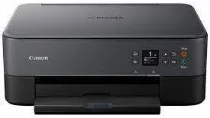
The Canon PIXMA TS6420a driver has incredible capabilities that allow the printer to be suitable for home and office use. For instance, the print speed for 4×6 photo paper is approximately 43 seconds for the borderless print mode. Similarly, the black document has an ESAT rate of 13.0 Images per minute (ipm), and the color has an ESAT rate of 6.8 ipm. Also, the total number of nozzles is 1792, with 1,152 for color and 640 for pigment black printing.
Canon PIXMA TS6420a Driver for Windows
Driver and Software for Mac OS
Driver for Linux
Specifications
The supported print resolution is up to 4800×1200 dots per inch (dpi), while the Ink type comprises PG-260 Pigment Black Ink and CL-261 Color Ink. Also, PG-260 Black can hold 7.5 ml in its standard volume on the Ink compatibility and 14.3 ml in its XL version. In addition, CL-261 Color can hold 8.3 ml in its standard volume and 12.12 ml in the XL version. Moreover, the paper ranges in sizes from 3.5×3.5, 4×6, 5×5, 5×7, 7×10, 8×10, Letter (8.5×11), Legal (8.5×14), Envelopes and Card Size(91mmx55mm).
Also, the Paper compatibility includes Plain Paper, High-resolution Canon Paper, Super High Gloss, and Photo Paper Pro Platinum. In addition, it supports Photo Paper Plus Glossy II, Photo Paper Plus Semi-Gloss, Photo Paper Glossy, Photo Paper Pro Luster, Matte Photo Paper, and Double-Sided Matter. Some Notable printer features include wireless printing, Document printing, photo printing, square photo printing, and borderless printing. The other are black and color ink printing, business card size printing, label printing, and AirPrint.
Regarding paper handling, the rear paper tray can hold up to 100 sheets of plain paper or 20 sheets of 4×6 and ten sheets of 5×7 photo paper. Also, the front paper cassette can hold 100 sheets of plain paper. Furthermore, the copy speed for FCOT (Color) is approximately 20 seconds, and the ESAT (color) is about 6.0 ipm. Some copy features include standard copy, two-sided copy, 2-on-1 copy, auto exposure copy, and document copy. Download Canon PIXMA TS6420a driver from Canon website.