
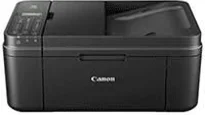
Printing with the Canon PIXMA MX494 model assures users of features such as print, copy, scan, fax, cloud printing, and Wi-Fi. The optimum print resolution with the device is up to 4800 x 1200 dots per inch (dpi). It also supports print technology for 2 FINE cartridges, such as pigment black and color. The minimum ink droplet size is about two picolitres (pl) through each of the print cartridges. Monochrome printing runs at a speed of approximately 8.8 images per minute (ipm).
Canon PIXMA MX494 driver Downloads for Microsoft Windows 32-bit – 64-bit and Macintosh Operating System.
Canon PIXMA MX494 Driver for Windows
Driver and Software for Mac OS
Driver for Linux
Supported Ink Catridges
Black Ink Catridge PG-445, Cyan, Yellow, Magenta Colors Ink Catridges CL-446
Whereas, color printing is at the rate of 4.4 ipm while photo printing is approximately 70 seconds. Borderless printing on A4 or the letter-sized paper is also possible at the said rate. The duplexing (printing on both sides of the page) component for this machine is also manual. The scanner type is through the flatbed and an automatic document feeder while the resolution is up to 600×1200 dpi. Besides, the average scan speed for the machine Canon PIXMA MX494 is about 15 seconds per page.
This process, through the flatbed, supports a maximum document size of A4, letter, and clean sheets. The optical character recognition is also feasible, while the scanning depth is 48-bit/24-bit for color scanning. On the other hand, input/output scanning depth for greyscale is 16-bit/8-bit. In the copying process, the first copy page takes approximately 28 seconds per page. Subsequently, the continuous copying procedure runs at a rate of 3.6 ipm.
Furthermore, the multi-copy feature can produce between 1 to 99 copies with a zoom level between 25% and 400%. Some of the other copying functions of the Canon PIXMA MX494 printer include document copying, photocopying, fit-to-page copying, and borderless copying. Besides, the faxing type is through Super G3 for color faxing. This way, the monochrome resolution is up to 300 x 300 dots per inch (dpi). Besides, color faxing has a resolution of 200 x 200 dpi. Download Canon PIXMA MX494 driver from Canon Website.