
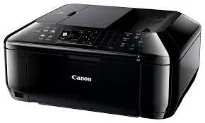
The printer’s excellent and classic choice includes the Canon PIXMA MX454 printer model, a multifunction printer with mobile printing. The all-in-one printer can print, copy, scan, send or receive fax messages over a relatively quick rate. The printer box contains the machine, 2 FINE cartridges, setup guide, power cord, telephone cable, software, and user manual CD. It can produce a maximum print resolution of up to 4800 x 1200 dots per inch (dpi).
Canon PIXMA MX454 driver Downloads for Microsoft Windows 32-bit – 64-bit and Macintosh Operating System.
Canon PIXMA MX454 Driver for Windows
Driver and Software for Mac OS
Driver for Linux
Supported Ink Catridges
Colors Cyan, Yellow, Magenta Ink Catridges CL-441, Black Ink Catridge PG-440
Apart from the main paper tray, the machine Canon PIXMA MX454 has an automatic document feeder (ADF) that can hold 30 sheets. It also has an approximate width of 458 mm, a depth of 385 mm, and a height of 200 mm. The weight of the machine is about 8.4 kg under normal circumstances. In a typical environment, the device supports an environmental temperature between 5 and 350C. On the other hand, the operating relative humidity is between 10 and 90% with no dew condensation.
In the scanning specifications, color scanning depth for input and output depth of 48-bit and 24-bit, respectively. On the other hand, halftone or greyscale scanning also has a thickness of 16bit and 8bit for input/output. This feature also works through the flatbed component, which produces optimum performance from the machine. In terms of compatibility, it works with TWAIN/WIA with a sufficient scanning width of 216 x 297 mm.
Copying applies to both monochrome and color mode, where the first copy out page is 21 seconds per page. Continuous copy procedure runs at a rate of 4.7 images per minute (ipm). The Canon PIXMA MX454 printer can also produce multiple copies between 1 and 99 pages. Besides, the zoom level of the machine at the smallest size is up to 25%. But the maximum enlargement level of the device is up to 400% of the original size. Download Canon PIXMA MX454 driver from Canon Website.