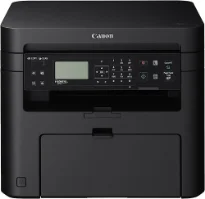
Printing with the Canon i-SENSYS MF211 printer model has a rate of up to 23 pages per minute (ppm) for A4 paper size. Simultaneously, the machine’s printing method is the monochrome laser print technology for the all-in-one function. It also has printing, copying, and scanning features like the available functions. It has an average print resolution of 600 x 600 dots per inch (dpi). Conversely, the maximum print resolution is up to 1200 x 1200 dpi.
Canon i-SENSYS MF211 driver Downloads for Microsoft Windows 32-bit – 64-bit and Macintosh Operating System.
Canon i-SENSYS MF211 Driver for Windows
Supported OS: Windows 11 (64-bit), Windows 10 (32-bit), Windows 10 (64-bit), Windows 8.1 (32-bit), Windows 8.1 (64-bit), Windows 8 (32-bit), Windows 8 (64-bit), Windows 7 (32-bit), Windows 7 (64-bit), Windows Vista (32-bit), Windows Vista (64-bit), Windows XP (32-bit), Windows XP (64-bit)
MF Drivers for Windows 32-bit(Recommended)
Supported OS:Windows 10, 8, 8.1, 7, XP, Vista 32-bit
119.77 MB
MF Drivers for Windows 64-bit(Recommended)
Supported OS:Windows 11, 10, 8, 8.1, 7, XP, Vista 64-bit
119.77 MB
Patch for Network Scan and USB Scan for Windows 32-bit and 64-bit
Supported OS:Windows 10, 8, 8.1 32-bit and 64-bit
7.72 MB
UFR-II-UFRII LT V4 Printer Driver for Windows 32-bit and 64-bit
Supported OS:Windows 11, 10, 8.1 32-bit and 64-bit
114.31 MB
Driver and Software for Mac OS
Supported OS: macOS Ventura 13, macOS Monterey 12, macOS Big Sur 11, macOS Catalina 10.15, macOS Mojave 10.14, macOS High Sierra 10.13, macOS Sierra 10.12, OS X El Capitan 10.11, OS X Yosemite 10.10, OS X Mavericks 10.9, OS X Mountain Lion 10.8, OS X Lion 10.7, Mac OS X Snow Leopard 10.6, Mac OS X Leopard 10.5
MF Printer Driver and Utilities for macOS
Supported OS:macOS 10.12 to 13
36.60 MB
Scanner Driver and Utilities for macOS
Supported OS:macOS 10.13 to 13
87.52 MB
Scanner Driver and Utilities for macOS
Supported OS:macOS 10.12
87.38 MB
MF Printer Driver and Utilities for macOS
Supported OS:macOS 10.11 to 12
22.21 MB
Scanner Driver and Utilities for macOS
Supported OS:macOS 10.11
84.36 MB
MF Printer Driver and Utilities for macOS
Supported OS:macOS 10.10
22.21 MB
Scanner Driver and Utilities for macOS
Supported OS:macOS 10.10
84.18 MB
TWAIN Scanner Driver and Utilities for macOS
Supported OS:macOS 10.5 to 10.11
69.50 MB
MF Printer Driver and Utilities for macOS
Supported OS:macOS 10.9
22.19 MB
Scanner Driver and Utilities for macOS
Supported OS:macOS 10.9
84.31 MB
MF Printer Driver and Utilities for macOS
Supported OS:macOS 10.8
22.09 MB
Scanner Driver and Utilities for macOS
Supported OS:macOS 10.8
81.36 MB
MF Printer Driver and Utilities for macOS
Supported OS:macOS 10.7
19.80 MB
Scanner Driver and Utilities for macOS
Supported OS:macOS 10.7
67.03 MB
MF Printer Driver and Utilities for macOS
Supported OS:macOS 10.6
47.25 MB
Scanner Driver and Utilities for macOS
Supported OS:macOS 10.6
84.89 MB
MF Printer Driver and Utilities for macOS
Supported OS:macOS 10.5
34.36 MB
Driver for Linux
Supported OS: Linux (32-bit), Linux (64-bit)
UFR II – UFRII LT Printer Driver for Linux
Supported OS:Linux
63.50 MB
Supported Toner Cartridges: 737 Black Toner Cartridge : upto 2400 Pages
However, the maximum resolution is possible through the automatic image refinement (AIR) component. The first print out time is about 6 seconds or less from the standby mode while supporting UFRII LT print language. The supported margin for envelope paper size is about 10 mm for all four sides in terms of the print margins. On the other hand, when different standard sizes are in use, the print margin is about 5 mm from all the four paper’s side.
The Canon i-SENSYS MF211 printer’s optimum duty cycle is up to 8,000 pages in a single month at optimum performance. At the same time, the internal memory of the device is up to 128 MB of RAM. But it also has a control panel of a black and white display with a liquid crystal display (LCD). This display component shows five lines. Furthermore, the machine has a width of 390 mm while the depth is about 441 mm. it also has a height of 312 mm.
The machine has a net weight of 10.1 kg, which is most suitable for both office and personal use environment. In a typical work environment, the temperature of the domain is between 10 and 300C. On the other hand, the relative humidity is between 20 and 80% with no condensation. Download Canon i-SENSYS MF211 driver from Canon Website
