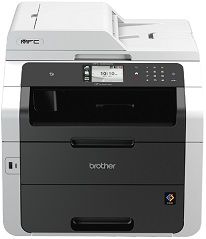
The Brother MFC-9335CDW is a machine which can create an initial first impression as a commercial printer. That is so, and much more, the printer can also be useful for private and home use. Not only in terms of functionality, but it also has a befitting shape for both the home shelf and the office.
Brother MFC-9335CDW Driver for Windows
Supported OS: Windows 11 (64-bit), Windows 10 (32-bit), Windows 10 (64-bit), Windows 8.1 (32-bit), Windows 8.1 (64-bit), Windows 8 (32-bit), Windows 8 (64-bit), Windows 7 (32-bit), Windows 7 (64-bit), Windows Vista (32-bit), Windows Vista (64-bit), Windows XP (32-bit), Windows XP (64-bit)
Full Driver and Software Package for Windows 32-bit and 64-bit(Recommended)
Supported OS:Windows 11, 10, 8.1, 8, 7, vista, xp 32-bit and 64-bit
159.94 MB
Printer Driver and Scanner Driver for Local Connection for Windows 32-bit and 64-bit
Supported OS:Windows 11, 10, 8.1, 8, 7, vista, xp 32-bit and 64-bit
35.08 MB
Driver and Software for Mac OS
Supported OS: macOS Catalina 10.15, macOS Mojave 10.14, macOS High Sierra 10.13, macOS Sierra 10.12, OS X El Capitan 10.11, OS X Yosemite 10.10, OS X Mavericks 10.9, OS X Mountain Lion 10.8, OS X Lion 10.7, Mac OS X Snow Leopard 10.6
Full Software Package for macOS
Supported OS:macOS 10.14
341.45 MB
Full Software Package for macOS
Supported OS:macOS 10.13, 10.12
344.53 MB
Brother MFC-9335CDW Full Software Package for macOS
Supported OS:macOS 10.9 to 10.11
31.13 MB
Printer Driver for macOS
Supported OS:macOS 10.15
31.35 MB
Printer Driver for macOS
Supported OS:macOS 10.14
31.26 MB
Brother MFC-9335CDW Printer Driver for macOS
Supported OS:macOS 10.12, 10.13
34.04 MB
Printer Driver for macOS
Supported OS:macOS 10.11
35.18 MB
Printer Driver for macOS
Supported OS:macOS 10.10, 10.9
14.35 MB
Brother MFC-9335CDW Printer Driver for macOS
Supported OS:macOS 10.6 to 10.8
13.82 MB
ICA Scanner Driver for macOS
Supported OS:macOS 10.15
2.28 MB
Scanner Driver for macOS
Supported OS:macOS 10.14
293.09 MB
Scanner Driver for macOS
Supported OS:macOS 10.13
293.23 MB
Brother MFC-9335CDW Scanner Driver for macOS
Supported OS:macOS 10.12
293.07 MB
Scanner Driver for macOS
Supported OS:macOS 10.8 to 10.11
294.43 MB
Scanner Driver for macOS
Supported OS:macOS 10.7, 10.6
5.78 MB
Driver for Linux
Supported OS: Linux (32-bit), Linux (64-bit)
LPR Printer driver for Linux
Supported OS:Linux (RPM Package)
684.33 kB
CUPSwrapper Printer driver for Linux
Supported OS:Linux (RPM Package)
15.92 kB
Scanner driver for Linux
Supported OS:Linux (RPM Package)
98.10 kB
Scanner driver for Linux
Supported OS:Linux (RPM Package)
116.23 kB
PC-FAX driver for Linux
Supported OS:Linux (RPM Package)
45.15 kB
LPR Printer driver for Linux
Supported OS:Linux (DEB Package)
681.93 kB
CUPSwrapper Printer driver for Linux
Supported OS:Linux (DEB Package)
13.12 kB
Scanner driver for Linux
Supported OS:Linux (DEB Package)
90.55 kB
Scanner driver for Linux
Supported OS:Linux (DEB Package)
108.64 kB
PC-FAX driver for Linux
Supported OS:Linux (DEB Package)
38.30 kB
Specifications
More interestingly, this Brother MFC-9335CDW printer has a based method on the electrophotographic LED printer method. Its internal memory is also about 192 MB which is a tremendous advantage for printers that would work at high speed and best quality. The control panel features a liquid crystal display component which measures about 3.7 inches in diagonal measurement. The colored display is of the TFT type.
The printer works on a power source of voltage between 220 to 240 volts of an alternate current whose frequency between 50 and 60 Hz. The approximate power consumption is about 1200 watts at its peak while printing involves a power usage of 375 watts. Copying with this device requires a power of 380 watts while the printer uses only 70 watts when it is just ready to print.
The deep sleep mode will mean the printer is running on 8.5 watts of energy and 1.7 watts for the deep sleep state. All the temperature measurements apply only to when the printer is working at an environmental temperature of 250C. By physical measurements, this printer also has proper physical dimensions that include a weight of 23.6 kg. More so, the height of the printer measures about 410 mm; the depth is about 483, the width is also up to 410 mm.
For the printer to thrive well at optimum performance and quality, certain physical conditions are vital. Such conditions include a temperature range between 10 and 350C during operation and 0 and 400C during storage. Download Brother MFC-9335CDW driver from Brother website.
