
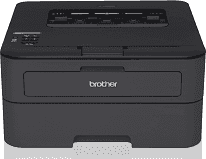
The Brother HL-L2360DW printer model uses the electrophotographic print method and a laser print technology. The device comes with an internal memory of up to 32 MB of RAM with the best of the processor. The printer displays with a liquid crystal display (LCD) screen that supports 16 characters in a single line. The input power source for the device is within the range of 110 to 120 volts of an AC at 50/60 Hz.
Brother HL-L2360DW Driver for Windows
Driver and Software for Mac OS
Specifications
The peak performance of the printer uses approximately 1080 watts of energy to produce the best quality. During the printing or the copying process, the power consumption is about 546 watts of electricity. Whereas, when both work at the quiet mode, the power usage is approximately 319 watts. The active method requires up to 58 watts; the sleep mode uses 3.9 watts, while the deep sleep takes 0.8 watts. When the printer is off, the power usage takes only 0.02 watts.
The depth of this Brother HL-L2360DW printer is about 14.2 inches, the width is about 14 inches, and the height is 7.2 inches. The weight of the printer is up to 15 lbs, which is equivalent to 6.8 kg. The primary means of connecting with this printer is through the USB 2.0 hi-speed port. Also, the measured standards in the device are according to the IEC 62301 standards. Furthermore, the noise level while printing is 50 dB (A) while at quiet mode, it is only 45 dB (A).
The supported media types for the Brother HL-L2360DW model include plain, thin, and recycled papers. Also, in terms of paper size, the variables include A4, letter, legal, A6, executive, and folio sizes. The input tray of this Brother HL-L2360DW printer can hold up to 250 sheets of plain paper of 20 lbs average weight. Also, it has a manual feed slot that accommodates one layer at a time. On the other hand, the output tray holds about 100 sheets of printed papers at a time. Download Brother HL-L2360DW driver from Brother website