
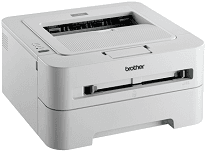
The printer has a magnificent body with an attractive interface and a print engine that works by the electrophotographic laser technology. The printer body is in white color that is attractive for all kinds of use ranging from private to public, personal and commercial. Also, the device has an internal memory of 8 MB of RAM and a powerful processor of the ARM9 type with a speed of 200 MHz.
Brother HL-2130 Driver for Windows
Driver and Software for Mac OS
Specifications
The standard input cassette for loading papers can hold up to 250 sheets of plain paper, thin paper or recycled paper. The warm-up time for the printer from a sleep mode is less than 7 seconds at a standard temperature of 230C. On the other hand, the same Brother HL-2130 device warms up from power on style, taking less than 25 seconds in time at the same temperature of 230C. However, the paper input through the manual slot can only take one sheet at a time.
The output paper cassette holds up to 100 sheets of printed paper in a face down with a standard weight of 80 gsm while one sheet comes in a face-up the pattern in a straight paper path. The trays also support thick paper, bond paper, and envelopes as other standard media types. The ideal weight range is between 60 and 105 gsm for the standard input tray while the field is between 60 and 163 gsm for the manual feed slot entry.
The resolution of this printer is at a standard of 600 x 600 dots per inch (dpi) whereas it can also reach a maximum of 2400 x 600 dpi at the HQ1200 high-quality mode. The interface for connecting the PC to this printer is through the regular USB 2.0 full speed port. Similarly, the device is compatible with Windows-based operating system versions, Mac and Linux. Download Brother HL-2130 driver from Brother website.